In this article, we are going to talk about what Bitdefender Anti-Theft is, what it does, and how to use it on Windows laptops. If you are interested in Bitdefender Anti-Theft for Android devices, read – How to use Bitdefender Anti-Theft on Android.
Video
- Meet Bitdefender Anti-Theft: Locate, Lock, or Wipe Stolen Devices Remotely
Click the corresponding link below to expand it and learn more.
What is Anti-Theft?
Laptop theft is a major issue that affects individuals and organizations alike. Even more than losing the hardware itself, the data lost with it can cause significant damage, both financially and emotionally. Yet few people take the proper steps to secure their important personal, business, and financial data in the case of theft or loss.
Anti-Theft is a Bitdefender Total Security module that packs effective anti-loss and anti-theft tools for your Windows laptop or tablet, remotely accessible from anywhere in the world via your Bitdefender Central account.
What tools are included in Anti-Theft?
These are the Anti-Theft tools for Windows:
- LOCATE: Shows the location of your device on Google Maps. The device you want to locate must be connected to the Internet. If the device is connected to a wired LAN with no Wi-Fi available, the location will be determined based on the IP address, which is considerably less accurate.
- LOCK: Locks your laptop and sets an alphanumeric password to unlock it if your Windows account doesn’t have a password. If you forget the password, click again Lock device in the Anti-Theft screen, then choose a new password. If the Windows account of the lost device already has a password, use an administrator account password to unlock the PC.
Note: If a standard Windows account is logged in when the Lock command is sent from Bitdefender Central, the following occurs:
- The screen is locked with no option to enter the PIN.
- After restart, the standard account disappears from the login screen.
- To fix this log in as an administrator → open Computer Management → Local Users and Groups → Users → locate the standard user → uncheck the “Account is disabled” checkbox.
- WIPE: Erases all data from the laptop including Windows, the operating system.
- SHOW IP: Displays the last known IP address for this device. This option becomes available only after the device has been located for the first time.
Are there any prerequisites for Anti-Theft?
To use the Anti-Theft features, the following prerequisites must be met:
- Bitdefender Total Security must be installed on the stolen laptop and activated with a Central account.
- The commands can only be sent from the Bitdefender Central account you linked your laptop to.
- The laptop you are trying to locate must be connected to the Internet to receive the commands from Central.
Specifically for the LOCATE feature:
- The accuracy of the location depends on how Bitdefender is able to determine it. The location is determined to within tens of meters if Wi-Fi is enabled on your computer and there are wireless networks in its range.
- If the laptop is connected to a wired LAN or 3G/4G modem with no Wi-Fi-based location available, the location will be determined based on the IP address, which is considerably less accurate. Basically, a location based on your IP address can only display the information provided by the ISP – most of the time the country, sometimes the city, or region.
- You might also see a message “Could not locate device” on the map because the location was not accurate if it was based only on the IP address of the device you are trying to find.
How do I access the Anti-Theft tools?
There are 3 ways to access the Anti-Theft tools:
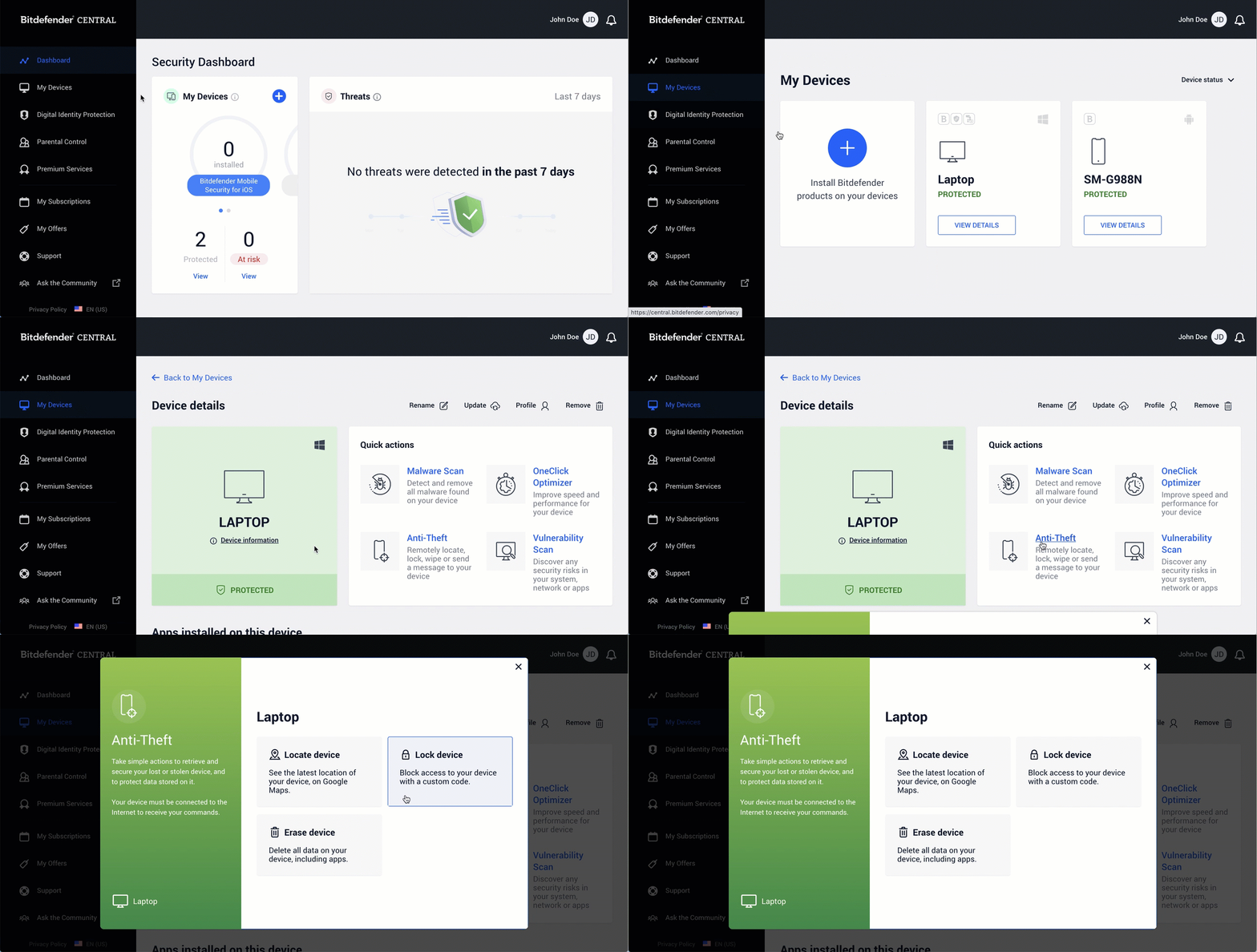
Option 1 – From any device with internet access
- Open a web browser and go to https://central.bitdefender.com
- Sign in to your Bitdefender Central account using your email address and password
- Select the My Devices panel in the sidebar
- Click the name of your stolen laptop from the list of devices
- Access the Anti-Theft option, then select the tool you want to use: Locate device, Lock device, or Erase device.
Option 2 – From Central app
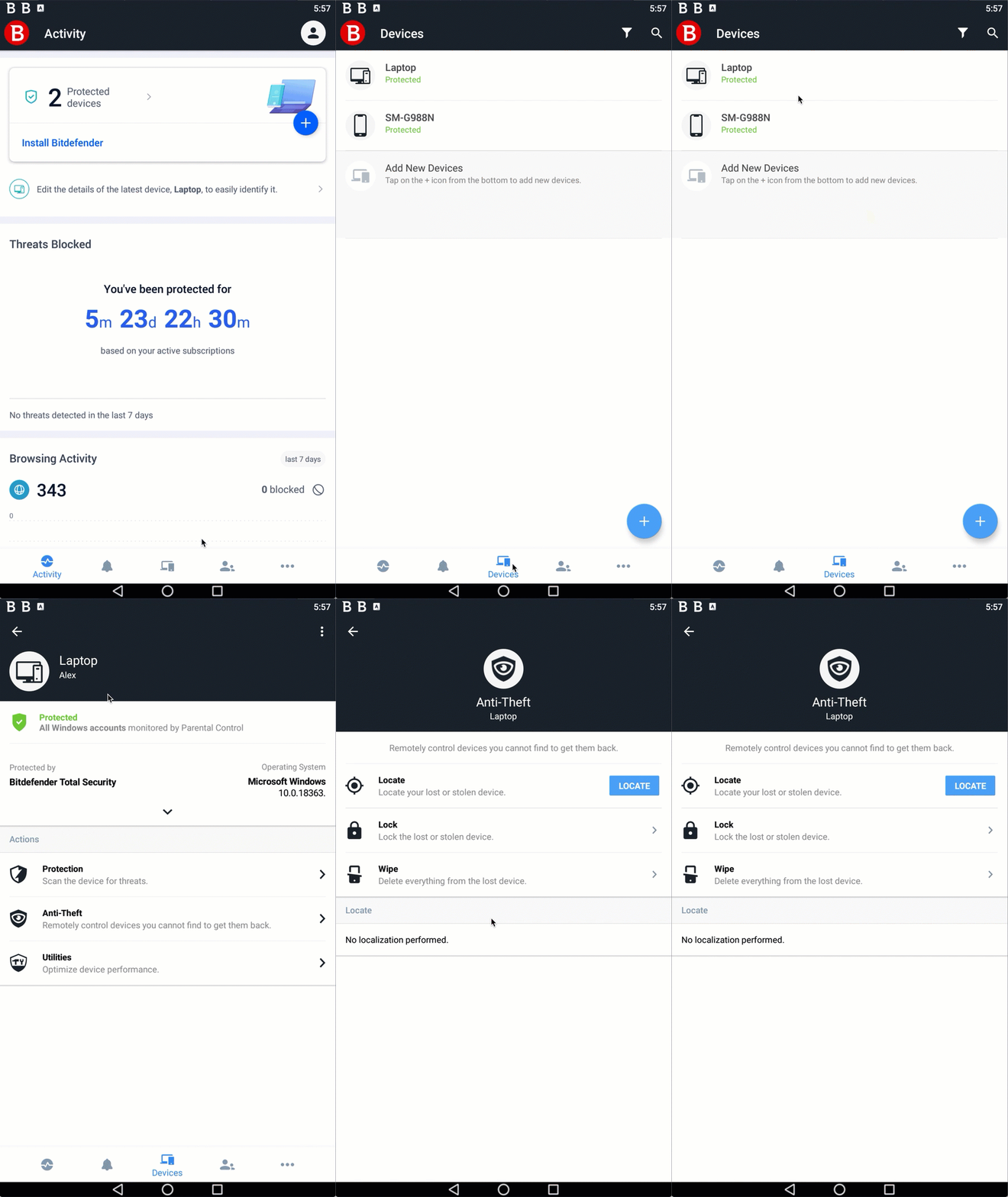
- Open the Bitdefender Central app on your smartphone. If you don’t have this app, you can install it from either App Store or Google Play.
- Sign in to your Bitdefender Central account from the Central app
- Tap Devices, at the bottom of the app
- Tap the name of your stolen laptop from the list of devices
- Choose Anti-Theft in the list of ACTIONS
- You are now in the Anti-Theft section. Select the tool you want to use.
Option 3 – From Bitdefender Total Security
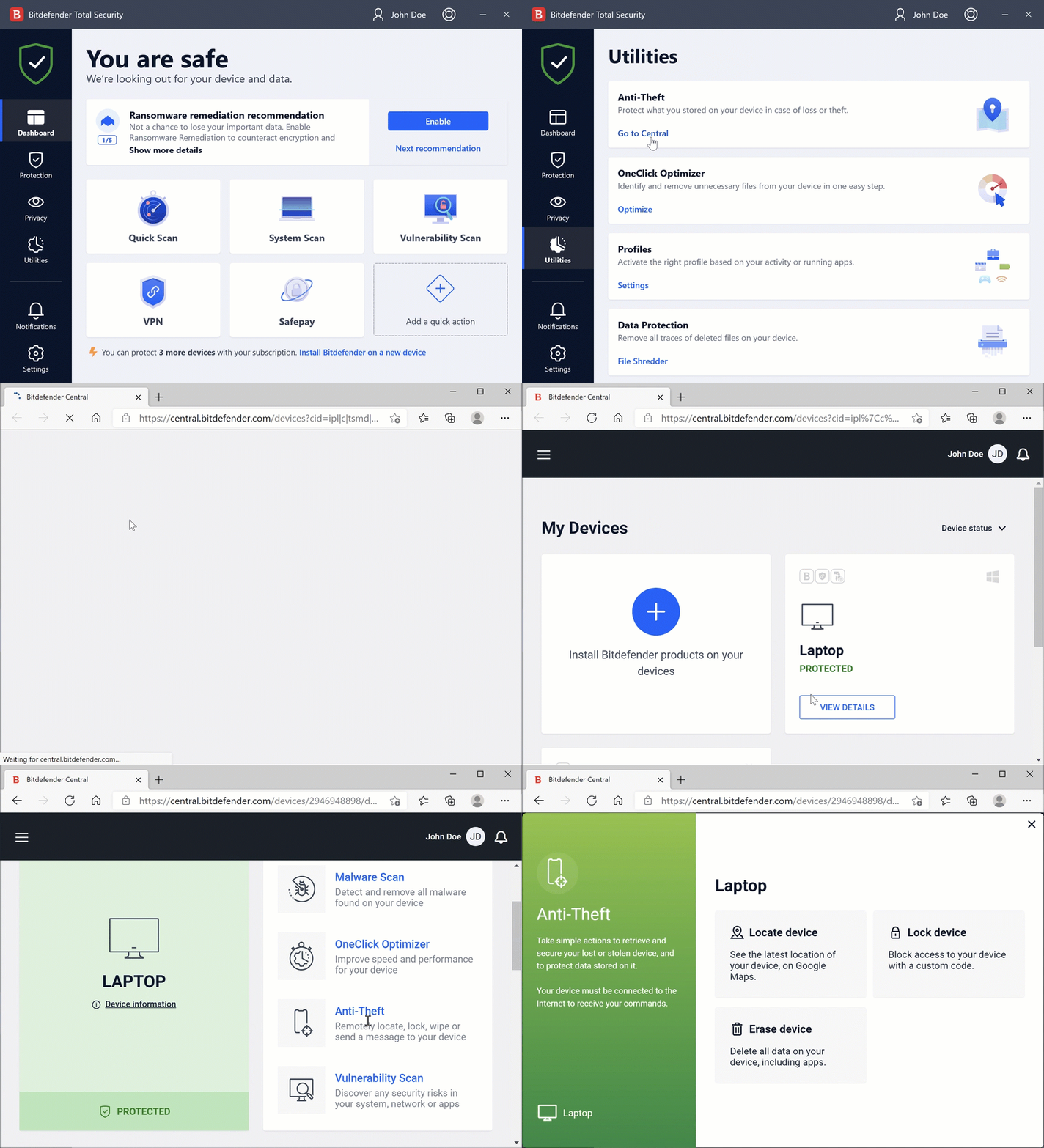
- Open Bitdefender Total Security installed on a Windows computer
- Click Utilities on the left-hand side of the Bitdefender interface
- Click GO TO CENTRAL on the Anti-Theft panel
- The Bitdefender Central page opens in your default internet browser. Sign in if prompted.
- Click the name of your stolen laptop from the devices listed on the page
- Choose the Anti-Theft option and select the tool you want to use
IMPORTANT!
Keep in mind that once you use Erase device, it will wipe out everything from your lost laptop. All Anti-Theft tools cease to function, there will be no operating system left behind. This action is irreversible. Make sure to use it only if you are sure that your laptop has been stolen and cannot be recovered.